Custom IPv6 Dashboard
LibreNMS + Custom IPv6 Client Dashboard
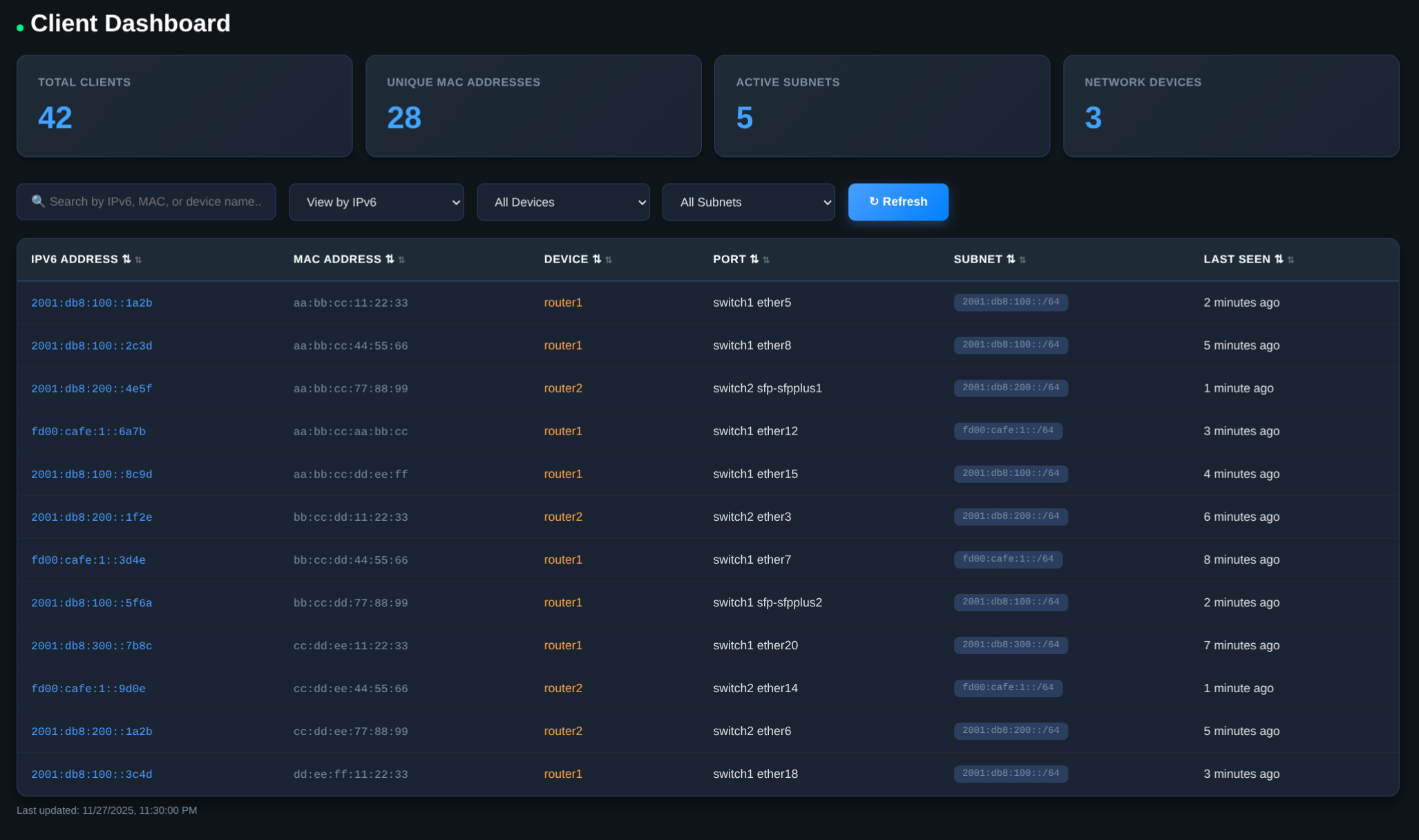
The Problem
The Network monitoring solutions that I have seen seem to be stuck in the past with IPv4 only networks, seemingly relying on ARP and Nmap scans of network blocks to find devices and services on the network. From what I have heard, a single IPv6 Subnet with a /64 prefix has some 18 quintillion Addresses. That does not include the extra 64 thousand other subnets in the /48 that likely is assigned to location
I have not done the math myself but scanning one address after another does not seem to be a good use of time. But good news! IPv6 neighbor discovery or ND tables do exist. I have just not found anyone else but routers/switches using them. So time to build my own with my good buddy Claude.
The Wish list:
- I want to know how many host clients are on my network.
- I want to be able to find IPv6 Addresses based on MAC addresses and MAC address based on IPv6
- I also would to know which port on my switches the device can be found.
- This wont’ tell me down to the VM but it will tell me which VM Host to look at and which MAC Address to search for in the NIC config
The Partial Solution
LibreNMS has some nice out of the box features, adds SNMP Monitoring and a basic Network hardware neighbor map Oh and there some nice uptime and health metrics in there. MikroTik’s RouterOS does not expose IPv6 neighbor tables via SNMP, so some more work was required.
The Solution:
Built a custom stack combining:
- LibreNMS for base device/port discovery via SNMP
- Custom sync service polling MikroTik REST APIs every 5 minutes
- /rest/ipv6/neighbor for IPv6↔MAC mappings from routers
- /rest/interface/bridge/host for MAC↔Port mappings from switches
- Python web dashboard with real-time filtering and multiple view modes (IPv6, MAC-grouped)
Bonus Discovery:
During testing, found one switch had 28,000+ bridge table entries due to misconfigured VLAN trunking That can’t be right, am I getting mac flooding or a switching loop somewhere? Further investigation showed each of my 8 SFP+ ports on my CRS309 had ~4000 MAC addresses in the table. Turns out that for every configured VLAN on a port creates a mac address entry for the ports own mac address. 4000 Vlans, by 8 ports. That’s a lot of MAC Addresses.
/interface bridge vlan
add bridge=bridge tagged=all vlan-ids=2-3999
While Allowing VLANs 1-3999 to be tagged on the port makes it easy to trunk any VLAN I throw at it, I realistically am only using about 15 Once I sorted out the tagged VLANs to those in use, the host table went from 28,000 hosts to about 215. And my REST API calls having to generate that many hosts went from 40+ seconds to sub second queries.
Sometimes the best monitoring tools reveal configuration issues you didn’t know you had!
Tech Stack: Docker, Python, LibreNMS, MariaDB, MikroTik RouterOS v7+ REST API8
homelab python mikrotik ipv6 automation
495 Words
2025-11-27 00:00 (Last updated: 2026-05-05 03:03)
32e92b2 @ 2026-05-05